![003 Logo Reversed White.png]](https://help.cargobase.com/hs-fs/hubfs/003%20Logo%20Reversed%20White.png?height=40&name=003%20Logo%20Reversed%20White.png)
Follow the steps below to set up a delegate approver:
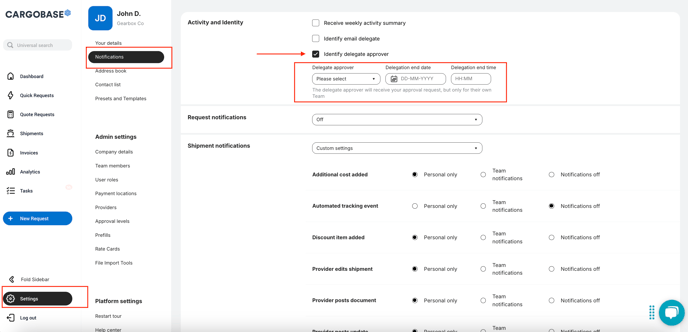
- Go to Settings on the sidebar.
- Look for the Notifications section.
-
Navigate to the Activity and Identity section to locate the Identify Delegate Approver checkbox.
-
Enable the Identify Delegate Approver box to activate the delegation feature.
-
Select the user who will be your delegated approver from the drop down list,
-
Enter the delegation end date and delegation end time to define when the delegation will expire. Once done, click Save.
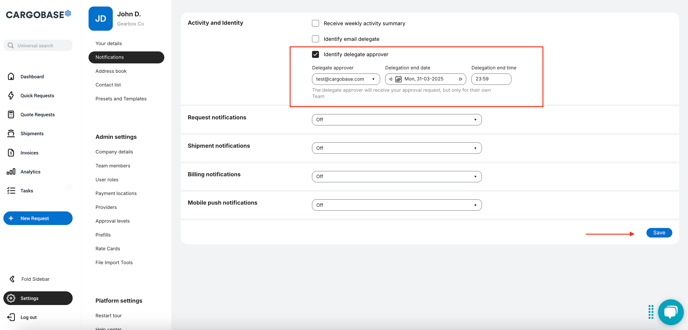
You will see a prompt message:
"The delegate approver will receive your approval request, but only for their own team."
- This means the chosen delegate approver will only receive approval requests if they support the same location as you.
- For example, if you support Location X, the delegate approver must also support Location X to receive the request. If they support Location Y only, they will not receive your approval requests.
Key Points to Remember:
- Once delegation is enabled, it takes effect immediately.
- Delegation is temporary and expires automatically at the set end date and time.
- The delegate approver will receive approval notifications on behalf of you only during the delegation period.